API Keys
Our system uses an authorization-based model, requiring an authorization key for access to our APIs (modules). API keys provide a seamless way to enable programmatic access to our APIs.
To generate an API key, navigate to Administration > Security > API Keys.

Generating API Keys
To start, click the 'Create API Key' button at the top-right of the screen.
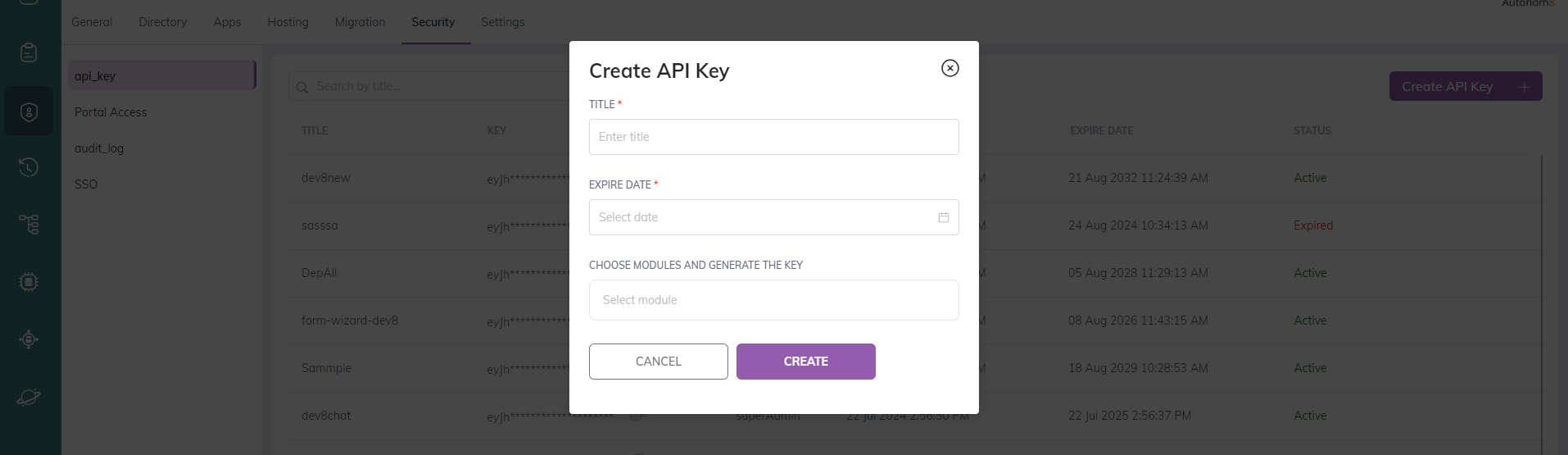
- Give it a name (TITLE).
- Set the EXPIRE DATE.
- Choose the MODULE.
There are four types of API modules that you can access. When generating a key for calling the APIs, you have the flexibility to grant access to individual APIs or any combination thereof:
- Deployment API: Used for deploying applications from A8Studio.
- Export Application API: Used to export the application's data history (data dump).
- Start New Process API: To start a new Assisted flow remotely.
- Check Dedupe: Used to verify duplicate records within the system.
To generate a key, select the checkbox next to the relevant API(s) and click the Generate button.

- After generating the key, simply copy the key by clicking on the 'Copy' icon.
Available API Scopes
Deployment API
With the Deployment API you can deploy your A8Studio applications directly into the A8Flow runtime environment. This streamlines the deployment process, making it efficient and hassle-free for the users.
Checkout: How to add the Deployment API key to A8Studio.
Export Application API
The Export Application API provides a comprehensive record of changes made in the application within a specified time frame, facilitating a seamless transfer of application modifications between environments.
URL: /flow/v2/exports/applications
Method: GET
Make a GET request to the above URL with your authentication key in the request headers. The result will be returned in JSON format and will include all instances/changes made in the application during the specified period.
For Query Parameters click here.
Start New Process API
The Start New Process API automates the initiation of new process instances, enhancing overall workflow efficiency. It allows for triggering an instance within a specific environment from a different one; a good example would be working seamlessly between the Solo and Assisted environments.
Check Dedupe API
The Check Dedupe API is used to verify and eliminate duplicate records within the system. It ensures data integrity by identifying and handling duplicate entries according to predefined criteria.