Webhook Node

A Webhook Node is used when your application needs to make a dynamic request to an external third-party system and wait for a response.
Typically used in scenarios such as payments, verifications, etc., where the user initiates a task and waits for an external process to complete.
It has three key stages:
- Request
- Waiting
- Completion
Webhook Node Properties
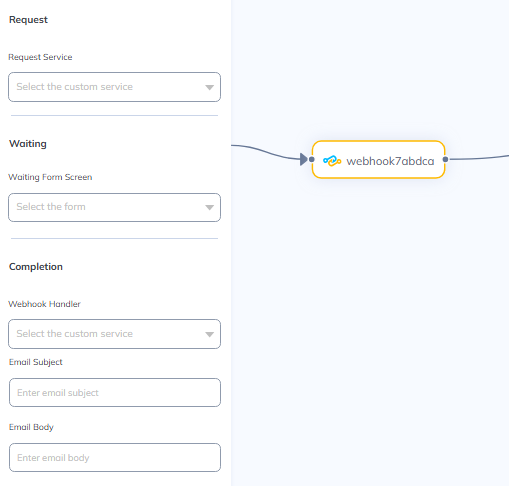
Request
This step is implemented using a custom service.
- Click the dropdown to attach your custom service.

- Here, the system sends a request to the third-party service.
- The system automatically generates a callback URL.
- The callback URL is injected into a special
params.callbackUrlkey. - It is then passed to the external service.
Example Custom Service:
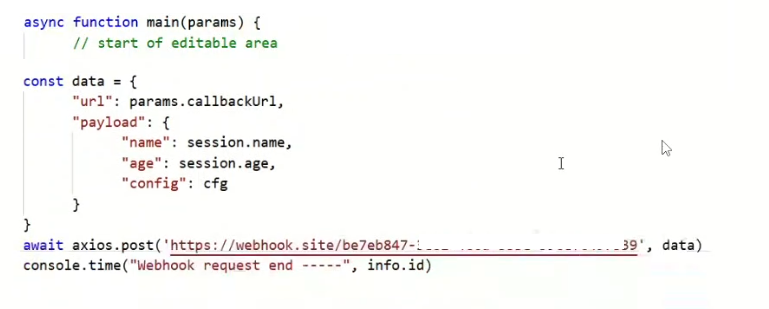
Note: The third-party system is expected to call this URL once it has completed its process.
- The payload/data sent along with the request can use session variables or other dynamic values.
Waiting
During this stage, the user is shown a waiting screen.
- Click the dropdown to attach your waiting screen form.

- It’s used for UI/UX purposes — to indicate the system is awaiting a response.
- The user will not be able to move the process back or forward during the waiting stage.
Completion
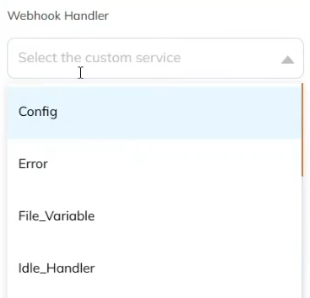
- Click the 'Webhook Handler' dropdown to attach your custom service.

- The third-party calls back using the callback URL.
- The platform then invokes a custom service to process this incoming response.
Process:
- Authenticates the caller.
- Validates the incoming data (
params.responsecontains the incoming data).- If the service executes successfully, the journey proceeds.
- If the service fails (i.e., throws an error), the journey halts.
Email Notification (Private Flows Only)
If users are expected to wait a long time for a response, you can send them a journey resume link via email.

- Set the Subject and Body of the email here.
If the customer's emailId is available, an email with a special placeholder ${soloResumeLink}(dynamically replaced with a link) can be sent, to let them resume the journey.